

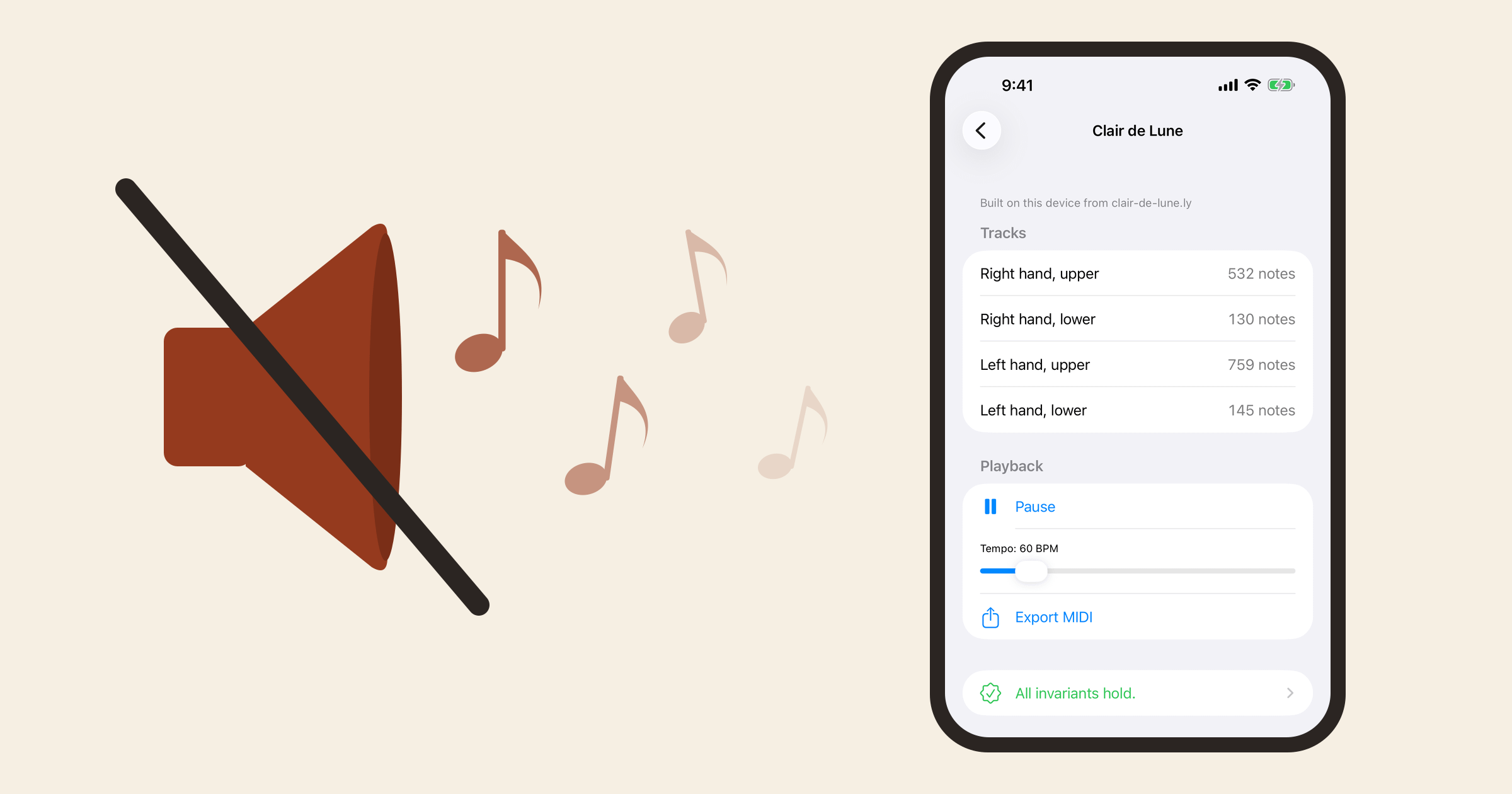
That picture is in the App Store listing. Clair de Lune, built on the device, four tracks, the button reading Pause, every check green. A UI test took it, and the UI test was talking to a player that cannot make a sound. That was the plan, and it is fine. What was not fine: for two days in August, the real player on a real iPhone could not make a sound either, and no automated test I had could tell. I found out the plain way: I played the app on my iPhone. I tapped Play, the button flipped to Pause, the player’s position moved forward, and nothing came out of the speaker. The exported MIDI played fine in GarageBand, so the engine was not the problem.
This post covers stops 7 and 8 of the course map: the view-model tests and the UI tests. Both stand on seams, protocols the app talks to so that a test can stand in for the real thing. The seams caught two things worth telling, and missed one, and the one they missed is the reason I still listen to the app before a release.
A thirty-second music sidebar
A MIDI file has no sound in it. It is a list of instructions: this key, this hard, at this moment, let go here. To hear it, something has to turn each instruction into audio, and that something needs recordings of an instrument to play from. A SoundFont is a file of those recordings (an .sf2), sampled note by note, with rules for stretching them across the keyboard. Your Mac has a General MIDI instrument set built in, which is why a .mid file plays the moment you open it. An iPhone has none. Hand Apple’s AVMIDIPlayer a MIDI file and no sound bank on iOS, and it plays all the instructions to nobody. Étude now ships a 9 MB piano SoundFont for exactly that reason.
What does a view-model test check?
Stop 7 is App/Etude/EtudeTests/PieceDetailViewModelTests.swift, 209 lines today. The piece detail screen builds a piece, plays it, changes its tempo and exports it, and all of that logic lives in a view model that never sees the screen or the speaker. It talks to two seams. PieceBuilding hides the engine, and MIDIPlaying hides the audio. The test’s makeSUT()hands back the view model with a spy for each, and registers all three for leak tracking with a 28-line helper, so a retain cycle anywhere fails the test that caused it.
Here is the playback test as it was born, in 9dbb6dc on August 26:
func testTogglePlaybackDrivesThePlayer() async {
    let (sut, builder, player) = makeSUT()
    builder.stub(voiceNames: ["melody"])
    await sut.build()

    sut.togglePlayback()
    XCTAssertTrue(player.isPlaying)
    XCTAssertTrue(sut.isPlaying)

    sut.togglePlayback()
    XCTAssertFalse(player.isPlaying)
}
The player here is a spy: a plain class whose play() sets isPlaying = true and whose pause() sets it back. No audio, no simulator, no waiting. The seven view-model tests in that file run in 0.013 seconds together.
There were three players behind MIDIPlaying, and it helps to name them now:
PlayerSpy, for the unit tests.SilentMIDIPlayer, for the UI tests. Its own doc comment: “No audio hardware, no timing: the-uiTestingplayer.”SystemMIDIPlayer, the one people get, wrappingAVMIDIPlayer.
The app picks between the last two with one launch argument:
private static func makePlayer() -> any MIDIPlaying {
    ProcessInfo.processInfo.arguments.contains("-uiTesting")
        ? SilentMIDIPlayer()
        : SystemMIDIPlayer()
}
Only the third one touches audio. Keep that in mind.
What did the UI test see that the unit test could not?
Stop 8 is the UI test target: four page objects, five flow files, eleven UI tests. The happy-path flow reads like someone using the app (today’s version):
let detail = LibraryScreen(app: app).openPiece("gymnopedie-1")
detail.waitForBuild()
detail.tapPlay()
XCTAssertTrue(detail.showsPause, "playing should flip the control to Pause")
The flows landed in 11968c0 at 08:58:17 on August 26. The next app commit, c420833, “Playback state is stored where Observation can see it”, landed four minutes and 45 seconds later. Its diff is small:
-    var isPlaying: Bool { player.isPlaying }
+    private(set) var isPlaying = false
     ...
         isPlaying ? player.pause() : player.play()
+        isPlaying = player.isPlaying
The bug: the view model’s isPlaying read straight through to the player, and the player sat behind a protocol. SwiftUI’s Observation tracks the stored properties of an @Observableclass. It had no way to know the player’s value changed, so it never redrew the button, and Play never became Pause. The comment the fix added says it in the repo’s own words: “the player itself is behind a protocol and invisible to Observation (a bug the UI tests caught that the unit tests could not).”
Why could the unit test not catch it? Look at it again. It calls togglePlayback() and then reads sut.isPlaying. Reading a value gets you the fresh value. Nothing in the test watches for a change notification, so it passed, and it was right to pass: the logic was correct. What was broken was the bit between the logic and the screen, and only a test that asks the screen can see that.
The history does not keep the red run. The commits record what was saved, not what was run. So I made both runs again on today’s toolchain, from snapshots of the two commits, iPhone 17 Pro simulator. At 11968c0, the view-model tests:
Test Case '-[EtudeTests.PieceDetailViewModelTests testTogglePlaybackDrivesThePlayer]' passed (0.001 seconds).
Executed 7 tests, with 0 failures (0 unexpected) in 0.013 (0.015) seconds
** TEST SUCCEEDED **
Same commit, the UI flow:
BuildAndPlayFlowTests.swift:23: error: -[EtudeUITests.BuildAndPlayFlowTests testBuildPlayAndExportTheGymnopedie] : XCTAssertTrue failed - playing should flip the control to Pause
Test Case '-[EtudeUITests.BuildAndPlayFlowTests testBuildPlayAndExportTheGymnopedie]' failed (17.348 seconds).
** TEST FAILED **
One commit later, at c420833, the same flow passes in 18.662 seconds.
Two honest notes. The four Phase 5 app commits share one timestamp, 08:58:17, so the history shows the order they were recorded in, not the order the work happened. And the catch was on my Mac’s simulator, not in CI: the CI app lane was red for an unrelated reason until the next day.
The numbers explain why projects split their tests into lanes. Seven unit tests in 0.013 seconds; one UI flow in 17 seconds. In CI on the 2026-10-10 push, the fast lane (swift test on the engine) took 38 seconds and the slow lane, which boots a simulator and runs the app and UI tests, took 8 minutes 50 seconds on iPhone and 9 minutes 46 seconds on iPad, job time including setup. The workflow file still calls the slow lane “suitable for nightly”. It still runs on every push, and the bug above is why I have not moved it.
Why page objects?
A page object is a small struct that knows one screen: its identifiers, its waits, and the verbs a person would use on it. PieceDetailScreen is 81 lines. It earns its place three ways.
One place for identifiers and waits. waitForBuild() waits on a predicate until the Play button is enabled; there is not a single sleep in the target.
Test bodies that read as steps. openPiece, tapPlay, showsPause is the bug report you would write by hand.
A change to the screen touches one file. Étude 1.1 removed the Build button (that story is next week). PieceDetailScreen lost its buildAndWait(), and the flow that takes the App Store screenshots changed by one line, detail.buildAndWait() to detail.waitForBuild(), in 1ab1155.
To be fair to the rule: PLAN.md says no raw app.buttons[...] in test bodies, and the flows break it three times, one track-name lookup and two back-button taps.
How did the same objects take the App Store screenshots?
On August 30 at 20:51 I added ScreenshotCaptureTests.swift in 743347c, 61 lines then and 61 lines now. Its doc comment says what it is: “Not a behavior test: it walks the pipeline the way the store listing tells the story”. It uses the same page objects as the real flows, and it asserts before every picture:
let detail = LibraryScreen(app: app).openPiece("clair-de-lune")
detail.waitForBuild()
detail.tapPlay()
XCTAssertTrue(detail.showsPause)
snap("01-build-and-play")
The assertion is the point. If a screen breaks, the run fails before it can save a broken picture for the store. snap is four lines:
let attachment = XCTAttachment(screenshot: XCUIScreen.main.screenshot())
attachment.name = name
attachment.lifetime = .keepAlways
add(attachment)
Run it with a result bundle, then xcrun xcresulttool export attachments pulls the PNGs out. Three minutes and 10 seconds after the first commit, a5db6df reordered the walk so it also runs on iPad: the share sheet comes last, because dismissing its iPad popover and moving on was flaky. Version 1.0 was submitted 22 minutes after that. The flow takes five shots; the listing uses four, and leaves out the diagnostics screen.
Now look at the top of this post again. The screenshot run launches with -uiTesting. So the store’s “build and play” picture, Pause button and all, was taken with SilentMIDIPlayer. The app you download plays sound. The robot that photographs it never has.
What could none of them hear?
I opened issue #3 on August 27 at 15:46, “In-app playback is silent on device: AVMIDIPlayer has no sound bank on iOS”.
It found two causes. The first was one argument in SystemMIDIPlayer:
player = try AVMIDIPlayer(data: midi, soundBankURL: nil)On macOS a nil sound bank falls back to the built-in instrument set. iOS has none, so playback “succeeds” in silence, which is the sidebar’s point. The second cause: the app never set up an audio session, so it got the default category, .soloAmbient, which the ring/silent switch mutes. Either one alone would have been enough.
Now line the three players up against the bug:
Player            Used by                          Touches audio?  Could hear the bug?
PlayerSpy         view-model unit tests            no              no
SilentMIDIPlayer  UI tests and the screenshot run  no              no
SystemMIDIPlayer  people                           yes             no test used it
Every automated layer talked to a fake, by design. The issue’s own section, “Why the suite never caught it”, opens with one line: “By design, no automated test listens.” The seam had done its job. It kept the audio hardware out of the tests so they could be fast and repeatable, and in doing that it kept the one bug that lived in the hardware out of the tests too. PLAN.md never even listed MIDIPlaying among its seams; it appears once, as a launch-argument switch “to skip audio hardware”. The seam that hid the bug was the one the plan treated as plumbing.
The nil was in the code for 52 hours and 48 minutes, from 9dbb6dc to 1585785, and inside three tags: phase-5, phase-6 and v0.1.0. It was not in v1.0.0, the first App Store build. No App Store user ever heard the silence.
What did the fix make loud, and what stayed manual?
Five commits on August 28, 700df35 to 679132a, in 6 minutes and 39 seconds. The first ships a sound bank in the app: FreePats’ “Upright Piano KW”, released under CC0, 9,456,310 bytes. The issue’s comments weighed it against bigger and less clearly licensed banks before picking it. The second is the important one. SystemMIDIPlayer now refuses to play without a bank:
guard let soundBankURL,
      FileManager.default.fileExists(atPath: soundBankURL.path) else {
    throw SoundBankMissingError(url: soundBankURL)
}
Its message: “The piano sound bank is missing from the app bundle, so playback would be silent.” Silence that reports success is the worst kind of failure, so a missing bank is now an error you can see. The third commit adds one line to load, setCategory(.playback), so the silent switch cannot mute it. The last two put the bank in the credits screen and in LICENSES.
Each fix commit carries its test. They pin the bank’s presence, its size (over a megabyte, because “a truncated bank would load but sound wrong”), its RIFF header, its licence text, the thrown error, and the session category. The closing comment says “the red test proved the default was .soloAmbient“; like the Observation red, that run is not in the history.
None of those tests listens. Nothing in the suite plays a note through a speaker or measures what comes out. The issue closed 22 hours and 20 minutes after it opened, with this comment: “Fixed and verified on device (iPhone 13 Pro): audible piano in both ring/silent switch positions.” And further down: “What stays manual, on purpose: audibility itself.”
That is the lesson of the post, and the issue had already written it: a seam that fakes the hardware verifies the protocol, not the physics. The fakes checked that the app asked for sound correctly. Only a person holding a phone could check that sound came out.
What is still missing?
Neither red run is in the history, the Observation one or the session one. I rebuilt the first for this post; the second I have only the issue’s word for.
The by-ear check was one device, one afternoon, an iPhone 13 Pro in both switch positions. It says the fix worked there, not on every device.
And it lives in an issue comment, not in the repo. There is no release checklist file. The check that caught the one bug no test could see is written down only in the issue it closed, which is a strange place to keep a step you mean to repeat.
Read, then try it
The repo is public: github.com/lismondbernard/etude.
Read App/Etude/EtudeTests/PieceDetailViewModelTests.swift first (stop 7), then App/Etude/EtudeUITests/PageObjects/PieceDetailScreen.swift and Flows/BuildAndPlayFlowTests.swift (stop 8), then git show c420833, then Flows/ScreenshotCaptureTests.swift, then issue #3 and git show 1585785.
Try it yourself: make the fake lie. I ran each step today at HEAD, on simulators, with the absolute path in front of the file names trimmed.
First, break the real player the way August did. In App/Etude/Sources/Features/PieceDetail/PieceDetailView.swift, makePlayer()ends with SystemMIDIPlayer(soundBankURL: SoundBank.bundledPiano). Change the argument to nil. Run the app’s unit tests:
Executed 33 tests, with 0 failures (0 unexpected) in 2.671 (2.699) seconds
** TEST SUCCEEDED **
Now the UI tests, all eleven, the screenshot robot included:
Executed 11 tests, with 4 tests skipped and 0 failures (0 unexpected) in 112.311 (112.339) seconds
** TEST SUCCEEDED **
All green, with the app’s only real player unable to play. (The four skips are the iPad-width tests skipping themselves on a phone, by design.) That is the whole post in two runs. The SystemMIDIPlayerTests stay green because they build their own player and never go through makePlayer(), and every UI test launches with -uiTesting, so none of them ever meets the line you changed.
So make one test meet it. Keep the nil, and in Flows/BuildAndPlayFlowTests.swiftchange app.launchArguments = ["-uiTesting"] to app.launchArguments = []. The flow now gets the real player. Run it:
PieceDetailScreen.swift:27: error: -[EtudeUITests.BuildAndPlayFlowTests testOpenPlayAndExportTheGymnopedie] : XCTAssertTrue failed - the piece should build on its own when it opens
Test Case '-[EtudeUITests.BuildAndPlayFlowTests testOpenPlayAndExportTheGymnopedie]' failed (27.808 seconds).
** TEST FAILED **
Red, and loud: the missing bank throws, the build fails on screen, and Play never unlocks. That is August’s fix doing its job. Put the bank back (git checkout -- App/Etude/Sources) and leave the launch argument off. The same flow, now with the real player and a real bank, passes in 15.071 seconds. Even that green only says the player loaded. The simulator borrows the Mac’s audio, so it cannot tell you what an iPhone speaker does.
Clean up with git checkout -- .. Then the half no script can do: run the app on a phone, flip the silent switch both ways, tap Play, and listen.
Last, the general one. List the fakes in your own suite. For each, write down the one thing it cannot tell you, and who checks that thing today.
One post left.
Next post, the last in this series: changing the app in public. Étude 1.1 went from an RFC to an ADR to 30 commits, deleted the Build button, and the tests said it was safe. It opens with stop 2, the writer contract I promised in Post 05, and ends with the open issues, if you want to be in the next one.